Showing posts with label Android. Show all posts

Wednesday, 21 December 2011

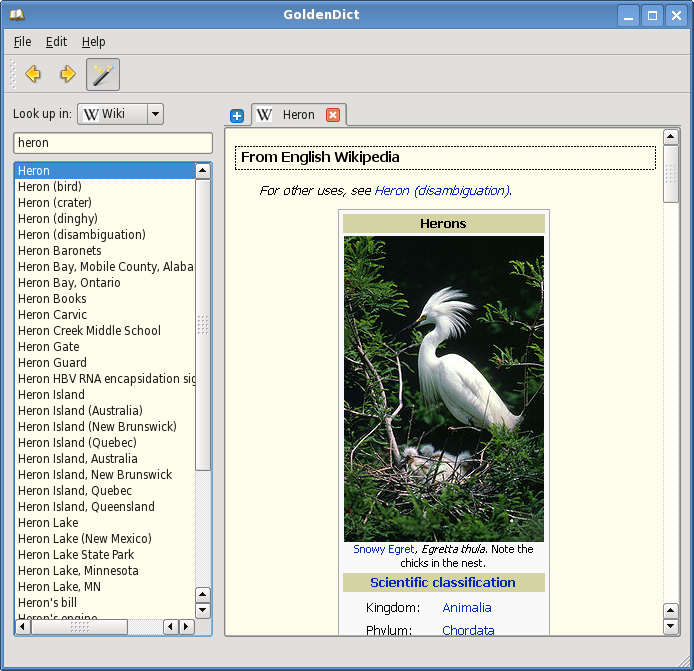
GoldenDict dictionary lookup program

The project aims to create a feature-rich dictionary lookup program. The latest release is 1.0.1. You are welcome to look around, download the program, provide feedback, and join the cause.

Features

The program has the following features:

  • Use of WebKit for an accurate articles' representation, complete with all formatting, colors, images and links.
  • Support of multiple dictionary file formats, namely:
    • Babylon .BGL files, complete with images and resources
    • StarDict .ifo/.dict./.idx/.syn dictionaries
    • Dictd .index/.dict(.dz) dictionary files
    • ABBYY Lingvo .dsl source files, together with abbreviations. The files can be optionally compressed with dictzip. Dictionary resources can be packed together into a .zip file.
    • ABBYY Lingvo .lsa/.dat audio archives. Those can be indexed separately, or be referred to from .dsl files.
  • Support for Wikipedia, Wiktionary, or any other MediaWiki-based sites to perform lookups in.
  • Ability to use arbitrary websites as dictionaries via templated Url patterns.
  • Ability to run arbitrary external programs for audio playback or content generation (text-to-speech, man pages etc) (use the latest Git version for this)
  • Support for looking up and listening to pronunciations from forvo.com
  • Hunspell-based morphology system, used for word stemming and spelling suggestions.
  • Ability to index arbitrary directories with audio files for pronunciation lookups.
  • Full Unicode case, diacritics, punctuation and whitespace folding. This means the ability to type in words without any accents, correct case, punctuation or spaces (e.g. typing 'Grussen' would yield 'grüßen' in German dictionaries).
  • Scan popup functionality. A small window pops up with the translation of a word chosen from another application.
  • Support for global hotkeys. You can spawn the program window at any point, or directly translate a word from the clipboard.
  • Tabbed browsing in a modern Qt 4 interface.
  • Cross-platform: Linux/X11 and Windows + portable to others.
  • Free software: GNU GPLv3+ license.

Mobile version

A commercial mobile version is now available for Android devices. Using it is the best way to support this project financially

Android Users Download Here

Saturday, 17 December 2011

SwiftKey X Beta Keyboard App for Android Mobiles and Tablets

SwiftKey X Beta is a new android app in the amazing Android appstore. SwiftKey X Beta is absolutely free, and works as an alternate android mobile keyboard app.


Why is it in worth mentioning this app? Cause, this is a revolutionary android text prediction keyboard app.


SwiftKey X Beta replaces the by-default on-screen android keyboard on mobile phones working on Android platform. SwiftKey offers options to customize your writing (typing) style. Some features include – enhanced careful typing, advanced predictive text for periodic fast typing. This new android app includes ‘auto correct options’ too. As far as I have seen the various Android apps, SwiftKey X Beta not only just predicts the current word you are typing, but it works on the next word using its pre-set algorithm.

You can very well, call it Android Intelligence.

SwiftKey X Beta features an alternate functionality, where you can assign various key setups on your android mobile. This android app tracks and displays the user’s typing statistics – which includes the user’s efficiency, number of keystrokes, and lots of other data. Last but not the least, SwiftKey Beta X includes the ability to choose between a light or dark theme, and facilitating the user to decide whether you want the arrow keys to be visible for navigation purpose or not.

Hopefully your either using this awesome Android app! Even if you don’t why not give it a try - SwiftKey X Beta | Homepage

Download Free from Android App Store:


Wednesday, 30 November 2011

Run Android Apps and Games on Windows Desktop PC Using BlueStacks App Player

Do you Love free apps and games available on Android market but don’t have an Android device to use them? Want to run your favorite Android apps on your existing Windows Desktop PC? Now, thanks to a new application from BlueStacks, it is possible for you to run Android OS and apps on any Windows x86-based devices, including desktops, laptops, netbooks, and tablets, without modifying your system.
The software, dubbed the BlueStacks App Player, is not a dual-boot solution. It runs Android OS and apps on Windows PCs with instant switch between Android and Windows – no reboot is required, just like you’d launch any other Windows application. Android apps can appear either as icons on the Windows desktop, or within a full-blown Android environment.


Free BlueStacks App Player comes preloaded with 10 apps and you can install upto 26 of your favorite Android Apps. The pre-loaded Android apps that come with this includes apps like Pulse news reader, Bloomberg app, , and a couple of games. You can either download new apps from the BlueStacks Channel or push your favorite apps from your Android phone to your PC via BlueStacks Cloud Connect.
Key Features of BlueStacks App Player:
  • Play Android apps fast and full-screen
  • Push your favorite apps from your Android phone to your PC using BlueStacks Cloud Connect
  • Run 10 pre-loaded apps “out of the box”
  • Install up to 26 more of your favorite apps
Check out the demo Video showing BlueStacks App Player:

How to install and use BlueStacks to run Android apps and games on Windows Desktop PC:
1. Step 1: Visit the BlueStacks App Player download page and download the software. The installation file comes in the form of a .msi installer and its 117 MB in size.
Step 2: Run the installer and follow the on-screen instructions to complete the installation process.
Step 3: Once the installation finished, a small BlueStacks icon will appear in the system tray. And you will find the App Player gadget on the top-right corner of your screen.
Step 4: Click on the app playe gadget on the desktop to expand the an App Tray, and you will find the pre-loaded apps. Click on app icon to launch the app in a full-screen virtualized version of the Android operating system.
Step 5: Click Get More Apps (down arrow icon) in the widget app tray to download new Android apps from BlueStacks Channels. You can also use the Cloud Connect service to synchronize the apps on your Android mobile device with BlueStacks on a computer. To use the Cloud Connect service, you will need to download the BlueStacks Cloud Connect App on from Google’s Android Market and install it on your mobile device.
Step 6: To quit BlueStacks App Player, right-click on BlueStacks icon in system tray and select Quit.
Currently, BlueStacks App Player only works on Windows 7 machines (may or may not work on Windows 8 ). There’s also a Mac OS X version of the application in the works. However, still no word if the developer plans to support Windows Vista, Windows XP, and Linux.


Sunday, 20 November 2011

Opera mini secret codes

Patrons of Opera mini browser will love this article, as they will get to know cute little productive secret codes which they can use in their opera mini. These secret codes are quite handy especially for those who do web browsing and would like to inspect site elements which would range from web page source code to management of browser stored cookies.

Opera mini is by far the most downloaded, most used and most loved mobile browser from among the league of different mobile phone based browsers. It availability for almost every other mobile phone operating system makes it the universal browser choice for everybody. Its pioneer efforts in compression of data, increasing of browsing speed, faster and easier loading of web page has already made it the favorite browser for majority of mobile internet users. Giving away secret hidden codes makes it quite an exciting not only for us i.e. technology enthusiasts but also for the regular opera mini browser user. These codes are to be used in the address bar of Opera Mini. Make sure that you delete http:// or http://www from the address bar before applying the following listed codes.

Codes:

opera:config / config:

If you are interested in knowing the configuration of your mobile phone browser, its capabilities and default settings then you can try the code config: in the address bar. The code will open up an internal page of opera mini called Opera Mini\\\\\\\'s Power User Settings page where you can tweak many browser settings like the timeout and whether the browser should make phone numbers click-able. This is quite handy as you might need to change the timeout wait time set by default.

server:source
Web developers will appreciate server:source which displays the source code of the current page. That way you can make out the entire html construction code of the site you are visiting. Its quite a handy tool when you have to view and edit your own sites html code setup.

opera:cache
Not exactly editable but it lets you know how much memory the cached content is chewing up in your mobile phone. This code can be your answer to your curiosity of opera mini slower loading. If the cached content is too much, you can always delete it and make the browser load faster.

about:
Most of us know that Opera Mini utilizes a proxy server technology to compress web pages for faster and better site loading. Opera Mini does this in order to minimize amount of data transfer and make the content load faster on the phone. Usage of this code allows display of information about the Opera Mini server.

debug:
It Displays a page listing many Opera mini server and client properties. The Host:[i] field tells you which Opera Mini server you are currently connected to. The known locations of servers are US, Poland, Iceland, Norway, South Africa etc. The server location is usually camouflages by an alphabetic notation. Servers between r02-12 are usually in the US. In certain cases the[i]r may be replaced with t,v,z etc.

feed:list
Opera mini is known to load feeds in a very mobile friendly format, using this secret code you will be able to conveniently navigate to the Feeds page

opera:about
This secret code displays copyright and license information for third party software used in the browser. Its not so much important but if you are only curious then there is no harm in simply trying it.

server:reset
A secret code of far more convenience. This clears all cookies stored in your locale thus safeguards you from being tracked by any analytics program.

server:refresh
You may not want to use this code as there is an easier way to reload the current browser page in opera mini, yet still, just for you can test this code and see if it refreshes the current page on your opera mini browser.

opera:blank  
Seeing blank page


The O code listings:
o:,
(Alphabetic O then : then ,) Opens the page To add a search engine to the list of already present

o:.
Usage of this code opens a blank screen showing two options i.e. Yes and No. Press Yes to search text in the web page (The Find in Page function).

o:/
Opens the page To add a search engine

o:!
Opens the page of To clear cookies
 
o:$
Shows the page Failed to connect to the internet

o:~
Shows blank screen with yes/no option.

o:d
Opens the page to Add a bookmark

o:h
Opens the page of About Opera

o:m
Opens the page of Search engines to manage (edit/delete/add)

o:A
Goes to the start page (Opera Mini 4.n only)

o:B 
Seeing menu on fullscreen

o:C  
seeing tool menu on fullscreen

o:I  
Go To Menu Setting

o:J  
Go To menu Help

o:L 
Go To list of shortcut 

o:V  
Go To History 

o:X 
Go To page About Opera (menu, ~tool, ~help, ~about) 

o:Y  
To bookmark this page 

o:Z
Goes to your bookmarks (Opera Mini 4.n only)

o:
Hangs Opera Mini, so do not try this one, at-least not on your own cell phone.

There are possibly more secret codes out there which one can use in their opera mini. I sincerely hope that there is none which would cause irreparable damage to the browser framework. If we are able to find more opera mini secret codes then we sure will post it here. Till then enjoy the above codes.

Sunday, 13 November 2011

Need for Speed Hot Pursuit v1.0.54

Supports: Android 2.0
Description: Feel the intensity of the chase and the thrill of demolition!
Escaping the law as a luxury car broker as the Pagani Zonda Cinque - or letting cold corridors as a high-speed police police interceptors like the Lamborghini Reventon. Fast-paced action experience as do the flight - or make the bust - with Need for Speed ​​Hot Pursuit ™ Android.


ACHIEVEMENTS CHASE
Up to 20 precision performance cars in 24 clashes adrenaline day and night tracks. Take it to the limit of 48 total Cop Racer Race Events, collect rewards, and the climb to the top of the ranks.
GRIEF IT on the road
As police, we are required by law, with roadblocks and barbed - or fry the electrical system of the Corridor with an EMP lock. As a race car, make the trip with overdrive, jamming, and oil slicks. Duel in the road!
From the # 1 racing franchise Interactive, brings the heat with Need for Speed ​​Hot Pursuit!

What's in this version:
Optimized for Android tablet!
* Game available update! Download now the best gaming experience yet! **
In response to your feedback, we have additional behind the scenes of settings to improve the overall stability of the game.

More Information:
https://market.android.com/details?id=com.eamobile.nfshp_na_wf


Angry Birds Seasons: Ham'o'ween! (Ad-free) v2.0.0

Angry Birds Seasons: Ham'o'ween! (Ad-free) v2.0.0
Supports: Android 1.5 +
Description: Angry Birds Seasons: Ham'o'ween!
It was a dark and stormy night ... but that does not stop the Angry Birds! Chasing pigs through 30 levels filled with pumpkin patches, exploding jack-o-lanterns, skeletons and creepy, lit by a full moon and the mysterious lantern light. You'll get some unexpected help from a new bird - begins with small things, but do not let its looks fool you! Complete all levels to find some special tricks and treats!


Halloween episode this year marks a year of great birds Angry Seasons episodes, but we're not done yet! Download now to get access to 205 great levels!
Prepare to Ham'o'ween with the latest update of Angry Birds Seasons! It will be all the tricks and is not from pigs this year, especially with a new bird!

New features include:
- All new ORANGE AVE
- 30 BONE-CHILL ING LEVELS
Recent changes:
V2.0.0 New features include:
- All new AVE ORANGE!
- 30 BONE-CHILL ING LEVELS!

More Information:
https://market.android.com/details?id=com.rovio.angrybirdsseasons


Mirror:

Saturday, 5 November 2011

Opera Mini 6.5.1 and Opera Mobile 11.5.2 for Android Now Available for Download

Opera Software has released new update for Android, now Opera Mini 6.5.1 and Opera Mobile 11.5.2 for Android available for download. This new update bring bug fixed to some recently introduces features.

Opera Mini 6.5

Yesterday Opera also released new Opera Mini 6.5 for Java, BlackBerry, iOS and Symbian S60, as well as Opera Mobile 11.5 for Symbian S60 devices.

The Opera Mobile 11.5.2 for Android update contains a lots of bug fixes. Redirecting webpages to themselves was causing site compatibility issues, so now it's been changed and users can bring the old behavior back from opera:config and enabling “Disable Client Refresh To Same Location”.
Opera Mini 6.5.1 and Opera Mobile 11.5.2 for Android are available in the Android Market and below.

New in Opera Mini 6.5.1 for Android:
~Reintroduced Protocol setting
~Fixed UI refreshing problems on Honeycomb
~Fixed issues with Hybrid UI displayed on Tablets with Touch
~Fixed issues with importing system bookmarks
~Fixed issues with star indication of bookmarked pages after device restart
~Fixed issues with download view not updated
~Various stability and performance fixes

New in Opera Mobile 11.5.2 for Android:
~Fixed issues with Flash 11
~Fixed issues with big Link accounts freezing Opera
~Fixed issues with web-fonts (f.e. www.golem.de)
~Fixed issues various stability and performance issues

Opera Mini 6.5 Data Usage

~Fixed problems with cache being deleted at startup
~Updated Mobile core to 2.9.201
~Enabled JavaScript refreshing

Download Latest Opera Mini 6.5.1 and Opera Mobile 11.5.2 for Android:
Opera Mini v6.5.1.apk (for Android, 840 KB)
Opera Mobile 11.5.2.apk (Android, 13 MB)

Other Opera Mini 6.5 and Mobile 11.5 for Java, BlackBerry, iOS and Symbian S60:
Opera-mini-6.5.26955-advanced-en-us.jad (796 Bytes)
Opera-mini-6.5.26955-advanced-en-us.jar (290 KB)
Opera Mini s60v1.sis (1.09 MB)
Opera Mini s60v2.sis (823.92 KB)
Opera Mini v6.5_BB_fw4.2.zip (for BlackBerry firmware 4.2.1, 328 KB)
Opera Mini v6.5_BB_fw4.3.zip (for BlackBerry firmware 4.3, 330 KB)
Opera Mini v6.5_BB_fw4.7.zip (for BlackBerry firmware 4.7, 331 KB)
Opera Mini v6.5_BB_fw6.0.zip (for BlackBerry firmware 6.0, 337 KB)
Opera Mini v6.5_iOS (for iPhone/iPod/iPad)
Opera Mobile v11.5.sis (S60 v3/v5, 7 MB)
Opera Mobile v11.5_al.sis (Asian language support S60 v3/v5, 8.4 MB)

Friday, 4 November 2011

UC Browser 8.0 Official English (Android/Symbian) and Diwali Edition (Java) Released

The new UC Browser v8.0 has been released officially for International users. The new UC Browser 8.0 version brings all new UI and splash screen for Symbian users and a new U3 kernel for Android which make browser more powerful and beautiful.

UC Browser (Ucweb) v8.0 (Build 11102120) available for Android and Symbian currently. Though Java, Blackberry, PPC etc need to wait more. Symbian version available only for S60v3 and S60v5, coz UC has stopped the further development for S60v1 and S60v2, means no UC Browser v8.x for them. The reason is new UC Browser series based on new U3 core by developed by UC Mobiles and some old phone's hardware limit not suitable for this.

Whats New in Android Version:
1. Click to zoom and the contents you want to see automatically fit your screen.
It’s so intelligent that other browser can only zoom and the pictures and texts are disappeared to anywhere else.
2. It’s so convenient to switch UA that make you browser www. Page by phone easily.
3. Traffic statistics.
Let’s have a look at how much traffic and money UC has saved for you. Maybe you can buy a ring for your wife.
Whats New in Symbian S60 V3 / V5:
1. UC Browser 8 for Symbian supported new UI interface and splash screen.
2. More intimate guidance by adjusting the wizard contents for new users.
3. Moving Read Mode entrance to shortcut menu.
Diwali Edition for Indian Users:
The special Diwali version made for Indian user to Celebrate Diwali with themes and look of this festival. Its also prepared and you'll see the changes automatically made for your installed browser using cloud technology of UC Browser. Start page changed to this occasion and also added theme in theme section. To download this version and check other Diwali special visit this UC Browser Diwali page.
Or download:
UC Browser Diwali Edittion.jar.

Download UC Browser 8.0 Official English Version for Android and Symbian:
UC Browser 8.0.3.107.sisx (Symbian S60v5, 1.7 MB)
UC Browser 8.0.3.107.sisx (Symbian S60v3, 1.3 MB)
UC Browser 8.0.4.110.apk (For Android 2.1+, 5 MB).

Wednesday, 2 November 2011

700++ apps and games collection for Android


Over 700 of the most popular games and Apps from Android Market!

400 Android Games Collection + HD + Emulators

AdventRush v1.01
Amtalee v1.0.22
Angry Birds v1.4.2 Ad-Free
Armored Defense v1.11
Armored Strike Online v2.066
Backgammon v1.22
Bathroom Reader v1.0.7
Beautiful Widgets v3.23
Blow Up_1.7.5
BowQuest- PandaMania! v1.53
Camel's Kitchen v1.0.2
Chopper Control v1.0
Clockr Evolution (donate) v1.0
Collectorz Movie v1.3
Colorix HD v1.7.2
ConnectIn_1.1.3
Dancing Android Live Wallpaper v1.1
Diagnosaurus DDx v1.42.0
DioPen Handwriting & Keyboard v1.1.1
DoggCatcher Podcast Player v1.1.1668
Doodle Jump_1.5.0
Droid Mini Golf - PRO v4.7.1
Droplitz Delight v1.3.1
Dual Mount SD Widget v2.11 ROOT REQ
DynamoKid Touch v3.0.2
Dynomaster v2.11
EasyMoney v1.5.4
ElectroDroid (Donate) v1.6
EMail Widget v4.1
Entity Sensor (EMF Detector) v3.5
eRay v2.91
F1 2010 Timing App - CP v2.58
FartDroid v4.0.1
Flee v1.06
Flight Director_1.7.2
Flightradar24 Pro v2.0
Folder Organizer v3.1
Forum Runner v1.1.14
Gem Magic v1.3
Gentle Alarm v2.5.9
Glucool Diabetes v1.4.2
Go!Chat Facebook Pro v2.1.4
Go!Chat_2.1.4
Got To Do v1.2.8
Guns n Glory v1.4.2
Hot Reboot v2.21 ROOT REQ
Hustler Mobile v1.1
Hyper Jump_1.6.5
Leave Devil Alone HD v1.0.2
Leonard Frog v3.8.4
Light Grid Pro Live Wallpaper v2.1.2
LightUp v1.10
Madness Hanoi v1.0
MathPac Calculator with Graphing v5.0
Mini Info v1.7.1
Moblox v1.2.2
Moxier Mail (Exchange Server) v2.8.0
mp3tagger pro v1.9
Mr. Hat and the Magic Cube v1.0
MX Moto_1.0.0
OfficeSuite Viewer v1.5.264
PapaStacker_1.3.1
Photaf 3D Panorama Pro v1.8.8
Photoid PRO v2.3.0
Pool Break Pro v1.7.0
PowerAMP Full Version Unlocker_1.0-build-10
RecForge - Audio Recorder v1.0.7
Remote VNC Pro v1.8.4
Ringleader Pro v1.3.2
Trainer UV Pro Full_2.3.5b
Shazam Encore v2.5.0-BB70126
Shoot U!_1.4.9
Slimeball Speedway v1.41
Slugs v3.3
Smart Keyboard Pro v3.10.1
SoundHound_2.3.0a
SpacePhysics_1.8.0
Steambirds v1.0
Super Tumble_1.3.3
Swords and Earrings - Tales of Andaria v1.2
Swype WVGA v2.10.52.13753
Sygic Aura Drive 2.0 build R-18575
Sygic Aura Drive 2.0.2b
SystemPanel App and Task Manager v1.0.7
Talking Carl v1.0
TapeMachine Recorder v1.6.7
Thinking Space Pro v2.1.1
Titanium Backup_3.5.7.1cracked ROOT REQ
Touch Racing Nitro v1.2.2
Twidroyd Pro v4.2.0
U Connect v1.1
Ultra keyboard v5.6.2
WidgetLocker Lockscreen v1.2.8
Wifi Tracker v1.0.56

and Alot more......


LOTS of Applications ! check it out your self .
Install apps with the .apk extension: 


1) Go to settings - applications - enable the 'unknown sources' option.

2) Put the .apk files somewhere on your SD card.

3) Open your file manager on the device (like Astro Manager from market). You can

delete the Ad using the key in ASTRO.Manager.Pro map.

4) Select a .apk file.

5) If you get the 'complete action using' pop-up, choose 'package installer'.


Password :  www.oxava.com

Friday, 21 October 2011

Download Android 3.0 Honeycomb Wallpapers For Phones and Desktop

Android 3.0, also known as Honeycomb is the latest version of the Google Android platform, designed from the ground up for devices with larger screen sizes, particularly tablets. As we know, Android 3.0 not only integrate with more useful function but also has a brand new, creative and wonderful user interface design include wallpaper, icon, menu and more. So do you want to add a little Honeycomb-esque style to your desktop, laptop, tablet, phone or whatever? Here’s are a selection of nine new wallpapers grabbed from the latest Android 3.0 SDK can be downloaded for free.
This wallpaper pack has 9 wallpapers with names: bluecrystal, blue line bots, bots, bucky, city, flowerbot, glowy hex, lotus and village. They are really beautiful, all available in high-resolution and should fit easily on your phones screen as well as your desktop or laptop if you want to show off your affinity for Android.
Download Android 3.0 Honeycomb Wallpapers For Phones and Desktop


Download Firefox 5 Final for Android

Mozilla has just released the Firefox web browser across all desktop platforms (windows, Mac and Linux). Along with the desktop version it also released Firefox 5 for Google Android smartphones which is built on the same technology platform as the desktop version.
Firefox 5 Final for Android
With Firefox for Android, you can synchronize your history, bookmarks, tabs and passwords between all your computers and mobile devices. Discover and install add-ons right from your phone or tablet to customize your browser exactly the way you like. Type less with the Awesome Screen, which gives you one-tap access to your bookmarks, history and custom list of search engines. Tabbed browsing allows for easy navigation and fast switching between Web sites with just one swipe of your finger.
One of the biggest enhancements to the new Firefox 5 is the “Do Not Track” option which give users more control over the way their browsing behavior is tracked and used on the Web. The feature, which lets users tell websites that they wish to opt-out of online behavioral tracking, is now easier to find in Firefox Preferences. There are also many others bug fixes such as faster page loads over 3G as well as improved compatibility with SwiftKey keyboard. The full list is available below.
Do Not Track option in firefox 5
What’s new of Firefox 5.0 mobile version:
  • Added Do Not Track privacy feature, enabling users to tell websites if they prefer to opt-out of online behavioral tracking
  • Improved page load speed, especially on 3G networks, and improved overall panning responsiveness
  • Improved compatibility with SwiftKey keyboard
  • Continued growth to mobile add-ons gallery, including over 20 featured add-ons
Firefox for android is available for Google Android (2.0 and above) and Maemo (Nokia N900) smartphones. See the list of supported devices.
Download Firefox 5 final for Android by visiting Firefox.com/m on your Android phone or Nokia N900. For android users, you can also download it through Android Market.

Saturday, 1 October 2011

Samsung Galaxy Pop


Samsung Galaxy Pop S5570


The new Samsung Galaxy Pop S5570 is a 3.2-inch capacitive touchscreen display mobile phone running the Google Android v2.2 OS .It is an affordable price smart-phone featuring 3G,Wi-Fi,and GPS along with the capacitive touchscreen display .


  • 3.2-inch capacitive touchscreen display
  • Google Android v2.2 OS
  • High speed connectivity : 3G HSDPA , Wi-Fi
  • Music Player With DNSe Sound Enhancement
  • GPS Navigation
  • 3.2 mega-pixel camera

Samsung Galaxy Pop S5570 mobile specifications :

  • Network : Quad band GSM , Dual band 3G HSDPA
  • OS: Android V2.2 (Froyo)
  • CPU: 600Mhz
  • General Form: Bar Type
  • Dimensions: 110.4 X 60.8 X 12.1 mm
  • Weight: 105 G
  • Display : 3.2-inch TFT Capacitive Touchscreen , 240 X 320 Pixels resolution
  • Camera: 3.2 MP
  • Video Recording: , QVGA@15fps
  • Battery : Li-Ion 1200 MAh
  • Music Player: MP3/WAV/EAAC+ Player With 3.5 Mm Audio Jack & DNSe Sound Enhancement
  • Ringtone Formats: Vibration, MP3 Ringtones
  • Radio: Stereo FM Radio With RDS
  • Video Player: MP4/H.264/H.263 Player
  • Data and Connectivity
  • GPRS/EDGE
  • 3G: HSDPA, 7.2 Mbps
  • Wlan: Wi-Fi 802.11 B/G/N
  • Bluetooth, V2.1 With A2DP
  • USB, MicroUSB V2.0
  • Java
  • Internal Memory: 160 MB
  • Expandable Memory : MicroSD,MicroSDHC Card Up To 32GB
  • GPS With A-GPS Support
  • Browser
  • Messaging: SMS, MMS, Push Email, Instant Messaging
  • Applications: Digital Compass,SNS Integration,Organizer, Document Viewer/Editor, Image/Video Editor,Google Search, Maps, Gmail, YouTube, Calendar, Google Talk, Picasa Integration,Voice Memo/Dial

The new Samsung Galaxy Pop Price in India is  Rs. 8,849.


Friday, 30 September 2011

Remote Desktop

Remote Desktop
For your Java Enabled Phone
link
Requirements: J2ME Java enabled Mobile phoneData Plan

Thursday, 29 September 2011

LG P350 Optimus Me


This smartphone includes connections G 3 + and WiFi allowing you to surf the Internet freely and stay in touch with your friends via social networks Facebook and Twitter. It also features Bluetooth 2.0 and connections that will facilitate your MicroUSB 2.0 file sharing.

Key Features

  • 3G +
  • GPS and Wi-Fi
  • MP3 player – FM radio
  • 3.15 megapixel camera – Video Camera
  • Memory Card Reader TransFlash / microSD

Main Features


  • 113.5*59.0*13.3mm (Length x Width x Thickness)

  • 130 g.

Communication / Networks


  • yes

  • yes

  • yes

  • yes

  • Yes, type not specified

  • Quad-Band

Photo & Video


  • yes

  • 3.2 megapixel

Music


  • yes

  • yes

  • 3.5mm

Personal Assistant


  • yes

  • yes

  • yes

  • PC

  • Android

  • yes

Screen


  • yes

  • 262 144 colors

  • 3.2 inches (8.1cm)

  • 320×480 pixels

  • TFT

Memory


  • TransFlash / microSD

  • 140Mo

Autonomy


  • 5.0 h

  • 450 h(Approx. 19 days)

  • Li-Ion 1500 mAh

Entertainment


  • compatible

  • Hi-fi/Mp3

Features


  • yes

  • assisted with drafting yes T9

  • Mobile Java (J2ME)

Connectivity


  • Micro USB 2.0

  • Bluetooth 2.0

  • 3.5mm
Price is Around Rs. 8999/- in India.

Tuesday, 27 September 2011

Android GLU Games Pack Download

GLU Games Pack for Android contains some of the awesome games which you can enjoy just by downloading and installing games in your Android Phone.

Contents in the package are as below .:

Android GLU Games Pack Download


back to top
Twitter Delicious Facebook Digg Stumbleupon Favorites More

 
Design by Free WordPress Themes | Bloggerized by Lasantha - Premium Blogger Themes | Affiliate Network Reviews