Showing posts with label Software. Show all posts

Saturday, 11 August 2012

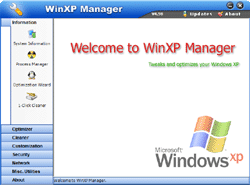
Yamicsoft WinXP Manager v8.0.1 with Keygen


WinXP Manager is a system utility that helps you optimize, tweak, and clean up Windows XP. It will increase your system speed, improve system security, and meet all of your expectations. It's compatible with Windows XP SP3 entirely!

Why Should I use WinXP Manager?
Windows XP is the most advanced Windows Operating System for home users and professionals alike. But is your Windows XP' size Large? speed Slow? system Insecure? and Unfit to your idea? Now it can be solved!
WinXP Manager is the powerful software tool to tweak and optimize Windows XP, it bundles more than 30 different utilities in one and help your system faster and more stable, secure and personal!

Features and Benefits of WinXP Manager


Information:
Get detailed system and all hardware information on your system; helps you to find out the missing Registration codes of Microsoft product; show all detailed information of running processes and threads on your machine; WinXP Manager offers optimization Wizard feature for the user without having any advanced knowledge.
Optimizer:
Tweak your system to improve windows startup and shutdown speed; monitor and free your Physical Memory; tweak your hardware to increase system speed and performance; disable some unnecessary services which start with windows; repairs Internet Explorer and certain other System Components to restore these functions.
Cleaner:
Find out which files or folders engross your disk space and shown with chart; Find and clean junk, unnecessary wallpaper and screen saver files to increase Hard Disk space; Duplicate Files Finder can scan your computer for files with the same size, name and modification time; Registry Cleaner can easily checks your registry and repair incorrectly linked registry entries, automatically remove invalid entries; Registry Defrag rebuilds and re-indexs your registry to reduce application response time and registry access time; smart uninstaller can uninstall and logoff installed programs neatly.
Customization:
Control what is started on Windows startup; edit context menus of mouse Right-Clicking; customize system desktop, menus, toolbar and notifications settings, change Windows logon background; change system icons; custom OEM information; automatically change your desktop wallpaper on background.
Security:
You can improve desktop, menus, control panel, windows logon securities, and enable numerous hidden performance options of system, disable system updates and error reports; hide and restrict to access drives, specify which applications are not allowed to be executed on your computer; encrypt/decrypt and shred files, camouflage folder to hide its content from Windows explorer, change the location of system folders; Privacy Protector can maintain your personal privacy by eliminating the tracks that you leave behind; create lots of randomization password once.
Network:
Optimize your Internet connection speed, manage all shares items, search for and find out opened ports on your system; Tweak your Internet Explorer easily; backup all data in Outlook Express; automatically check the invalid URLs in your favorites and parse domain name; Message Sender can easily send messages to others.
Misc. Utilities:
Show the collection of Windows utilities; control your computer when you're not at home; apply XP visual style to any Windows applications; appoint logging on time of any account users.


Yamicsoft Vista Manager v4.1.6 with Keygen


Vista Manager is a system utility that helps you optimize, tweak, and clean up Windows Vista. It will increase your system speed, improve system security, and meet all of your expectations. It's compatible with Windows Vista SP1 entirely!

Why Should I use Vista Manager?
Windows Vista is the Operating System for home users and professionals alike. Windows Vista brings clarity to your world, so you can more safely and easily accomplish everyday tasks and instantly find what you want on your PC.

Vista Manager is the powerful software tool to tweak and optimize your Windows Vista, it bundles more than 30 different utilities in one and help your system faster and more stable, secure and personal!
Features and Benefits of Vista Manager
Information:
Get detailed system and all hardware information on your system; show all detailed information of running processes and threads on your machine; Vista Manager offers 1-clicking cleans your system automatically.
Optimizer:
Tweak your system to improve windows startup and shutdown speed; tweak your hardware to increase system speed and performance; Optimize Task Schedule to turn off unnecessary system tasks.
Cleaner:
Find out which files or folders engross your disk space and shown with chart; Find and clean junk files to increase Hard Disk space; Duplicate Files Finder can scan your computer for files with the same size, name and modification time; Registry Cleaner can easily checks your registry and repair incorrectly linked registry entries, automatically remove invalid entries; Registry Defrag rebuilds and re-indexs your registry to reduce application response time and registry access time.
Customization:
Control what is started on Windows startup; tune up Vista boot menu; edit context menus of mouse Right-Clicking; customize system desktop, menus, toolbar and notifications settings; automatically change your desktop wallpaper on background.
Security:
You can improve desktop, menus, Windows logon securities, and enable numerous hidden performance options of system, disable system updates and error reports; hide and restrict to access drives, specify which applications are not allowed to be executed on your computer; encrypt/decrypt and shred files, change the location of system folders; Privacy Protector can maintain your personal privacy by eliminating the tracks that you leave behind; create lots of randomization password once.
Network:
Optimize your Internet connection speed, manage all shares items; tweak your Internet Explorer easily.
Misc. Utilities:
Show the collection of Windows utilities; help you find out the installation key of Windows, Office products; shutdown your PC or remind you automatically.


Yamicsoft Windows 7 Manager v4.1.1 Full with keygen

Windows 7 Manager is a system utility that helps you optimize, tweak, and clean up Windows 7. It will increase your system speed, improve system security, and meet all of your expectations.


Why Should I use Windows 7 Manager?

Windows 7 is the newest Operating System for home users and professionals alike. Windows 7 brings clarity to your world, so you can more safely and easily accomplish everyday tasks and instantly find what you want on your PC.

Windows 7 Manager is the powerful software tool to tweak and optimize your Windows 7, it bundles more than 30 different utilities in one and help your system faster and more stable, secure and personal!
Features and Benefits of Windows 7 Manager :

Information
Get detailed system and all hardware information on your system; help you find out the installation key of Windows, Office products; show all detailed information of running processes and threads on your machine; Windows 7 Manager offers 1-clicking cleans your system automatically.

Optimizer
Tweak your system to improve windows startup and shutdown speed; tweak your hardware to increase system speed and performance; Optimize Task Schedule to turn off unnecessary system tasks.

Cleaner
Find out which files or folders engross your disk space and shown with chart; Find and clean junk files to increase Hard Disk space; Duplicate Files Finder can scan your computer for files with the same size, name and modification time; Registry Cleaner can easily checks your registry and repair incorrectly linked registry entries, automatically remove invalid entries; Registry Defrag rebuilds and re-indexs your registry to reduce application response time and registry access time.

Customization
Control what is started on Windows startup; tune up Windows 7 boot menu; edit context menus of mouse Right-Clicking; customize system desktop, menus, toolbar and notifications settings; automatically change your desktop wallpaper on background.

Security
You can improve desktop, menus, Windows logon securities, and enable numerous hidden performance options of system, disable system updates and error reports; hide and restrict to access drives, specify which applications are not allowed to be executed on your computer; encrypt/decrypt and shred files, change the location of system folders; Privacy Protector can maintain your personal privacy by eliminating the tracks that you leave behind; create lots of randomization password once.

Network
Optimize your Internet connection speed, manage all shares items; tweak your Internet Explorer easily.

Misc. Utilities
Show the collection of Windows utilities; split and merge any file


Monday, 23 January 2012

ESET NOD32 Antivirus 5 [Full] [Free] [Crack]

Image

Built on the award-winning ThreatSense engine, ESET NOD32 Antivirus proactively detects and disables more viruses, trojans, worms, adware, spyware, phishing, rootkits and other Internet threats than any program available.ESET NOD32 Antivirus provides: Proactive Protection: The award winning ThreatSense technology combines multiple layers of detection protecting you from Internet threats before it is too late.Precise Detection: ESET accurately identifies known and unknown threats. It consistently wins top awards from testing labs and is recognized for having zero false positives.1Lightweight Design: Requires less memory and CPU power, allowing your computer to run fast, making more room for games, web browsing, and emailing.Fast Scanning Speeds: Highly efficient program ensuring fast file scanning and product updates. It runs quietly in the background.Proactive, precise, lightweight and fast. You wont find a better antivirus program. 

DOWNLAOD:>


http://www.megaupload.com/?d=7B83RSMM

http://bc.vc/PDIfZ

Friday, 20 January 2012

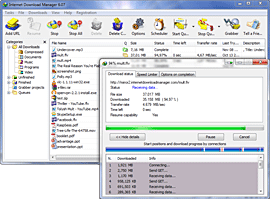
Internet Download Manager 6.07 Build 16 Full Version Keygen

Internet Download Manager (IDM) is a tool to increase download speeds by up to 5 times, resume and schedule downloads. Comprehensive error recovery and resume capability will restart broken or interrupted downloads due to lost connections, network problems, computer shutdowns, or unexpected power outages. Simple graphic user interface makes IDM user friendly and easy to use.Internet Download Manager has a smart download logic accelerator that features intelligent dynamic file segmentation and safe multipart downloading technology to accelerate your downloads. Unlike other download managers and accelerators Internet Download Manager segments downloaded files dynamically during download process and reuses available connections without additional connect and login stages to achieve best acceleration performance.

Internet Download Manager supports proxy servers, ftp and http protocols, firewalls, redirects, cookies, authorization, MP3 audio and MPEG video content processing. IDM integrates seamlessly into Microsoft Internet Explorer, Netscape, MSN Explorer, AOL, Opera, Mozilla, Mozilla Firefox, Mozilla Firebird, Avant Browser, MyIE2, and all other popular browsers to automatically handle your downloads. You can also drag and drop files, or use Internet Download Manager from command line. Internet Download Manager can dial your modem at the set time, download the files you want, then hang up or even shut down your computer when it's done.

Other features include multilingual support, zip preview, download categories, scheduler pro, sounds on different events, HTTPS support, queue processor, html help and tutorial, enhanced virus protection on download completion, progressive downloading with quotas (useful for connections that use some kind of fair access policy or FAP like Direcway, Direct PC, Hughes, etc.), built-in download accelerator, and many others.
Version 6.07 adds IDM download panel for web-players that can be used to download flash videos from sites like YouTube, MySpaceTV, and Google Videos. It also features complete Windows 7 and Vista support, YouTube grabber, redeveloped scheduler, and MMS protocol support. The new version also adds improved integration for IE and IE based browsers, redesigned and enhanced download engine, the unique advanced integration into all latest browsers, improved toolbar, and a wealth of other improvements and new features.


Download Internet Download Manager  6.07 Build 16 with Keygen 100% Works


or 

Sunday, 25 December 2011

Pro-Key-Lock

Pro-Key-Lock, and its smaller cousin Kid-Key-Lock, are powerful and easy to use utilities that can be used to lock specific keyboard an mouse functions.
Pro-Key-Lock is ideal to be used in order to prevent users from accidentally pressing unwanted keyboard and mouse buttons.
When Pro-Key-Lock is running, an indicator icon will appear on the system tray. When you click on the tray icon, a pop-up menu will appear. All program functions, including the setup dialog box are accessible from this menu.

The program works on Windows 2000, Windows XP, Windows Vista and the beta version of Windows 7.

Features

  • Very simple to setup and run
  • Seats on tray for easy access
  • Mouse Lock options:
    • Left mouse button
    • Middle mouse button
    • Right mouse button
    • Double click
    • Mouse wheel
  • Ability to lock mouse clicks inside or outside a user-defined rectangular region.
  • Keyboard lock options:
    • Ability to lock specific keys including keys found in non-standard keyboards (e.g. media player keys, web navigation keys) .
    • Compatibility with non-US and multilingual keyboards.
    • Ability to lock keys in non-standard keyboards.
    • Ability to lock key combinations. 

Saturday, 24 December 2011

Kid-Key-Lock

Kid-Key-Lock is a simple program to lock specific keyboard and mouse  functions.
Kid-Key-Lock is ideal to be used in order to prevent toddlers from accidentally pressing unwanted buttons on your keyboard and mouse.
When Kid-Key-Lock is running, an indicator icon will appear on your system tray. When you click on the tray icon a pop-up menu will appear. All program functions, including the setup dialog box are accessible from this menu.
The program works on Windows 2000, Windows XP, Windows Vista and the beta version of Windows 7.


Features

  • Very simple to setup and run
  • Seats on tray for easy access
  • Mouse Lock options:
    • Left mouse button
    • Middle mouse button
    • Right mouse button
    • Double click
    • Mouse wheel
  • Keyboard lock options:
    • Standard character keys (letters, numbers, signs, etc)
    • Additional keys (Navigation keys, function keys, ins/del, home/end, etc)
    • Windows system shortcuts(e.g. alt-tab, win-key, etc) 

Wallpaper Rotator

 Features

  • Does not consume any system resources (does not stay resident)
  • Automatically scans user selected folder and its subfolders for images
  • Can Read/follow windows shortcuts to images and folders.
  • Supports bmp, jpeg and png image files
  • Option to correctly stretch images without disturbing their aspect ratio
  • Option to automatically choose a desktop background color that "fits" with the image
An important (and very handy) feature of wallpaper rotator is that it can read and understand windows shortcuts to image files or folders as if they were real image files and folders. This is very handy beacause you can set as your "source folder" an empty folder and then create and place there shortcuts to as many folders as you wish or shortcuts to indivisual image files.

Friday, 23 December 2011

The Talking Moose XP

The Talking Moose is a fun desktop enhancement that is actually an animated Moose character which will pop up on your screen and either tells jokes, says witty quotes, compliments you, or simply insults you. Watch your friends reactions when your computer talks out of the blue saying things like The more you run over a dead cat, the flatter it gets. The Moose uses text to speech technology that allows you to program him to say anything you want.


Right click on The Moose icon in the system tray and select Moose Phrases. You can then select the following categories: Greetings, Random Phrases, and Goodbyes. It also includes a game in which he interacts with called The Bird Race. Version 5 has weather functionality added, speak windows functionality added, Moose text Web browser functionality added to Say It, and other improvements.
What's new in this version: Version 5 has weather functionality added, speak windows functionality added, Moose text Web browser functionality added to Say It, and other improvements

Thursday, 22 December 2011

Wallpaper Rotator 0.5

Wallpaper Rotator allows to dynamically change the desktop background. While this is a native feature in Windows 7, XP users need to rely on third-party applications like this to periodically change the wallpaper.

Wallpaper Rotator 0.5

This version includes the following improvements:
  • Saving the choice of "Random Order (Shuffle Mode)"
  • Updating the configuration file when the user removes a picture from the list
  • Window size more adequate to files with long paths
  • Code improvements that reduced the memory required to the program run in the background
  • More readable code, with renaming of functions to more intuitive names and separation of design code from behavior code (can still be improved)

ZSoft Uninstaller 2.5

ZSoft Uninstaller is the better and easier way to uninstall programs on your computer.
ZSoft Uninstaller can be used as a Add/Remove applet replacement, but not only that, it can also:


  • Analyze an installation so it can be completely uninstalled (also supports reboots of the computer as the process is split into two: Before and after the installation)
  • Search for leftovers after uninstalling a program
  • Cleanup in the programs starting on your computer at startup
  • Find and delete temporary files
  • Find and delete empty folders
  • Delete entries from programs that are no longer installed
  • Hide Windows Updates
  • Hide entries from the list that you are never going to uninstall (drivers etc.) making the list smaller and therefore easier to manage.
  • Show more information than available though add/remove
  • Automatically find entries from programs that are most likely already uninstalled
  • Automatically find entries that are considered "crap-ware"
  • (Off course) search the list of installed software

Wednesday, 21 December 2011

Marble virtual globe and atlas

Marble is a Virtual Globe and World Atlas that you can use to learn more about Earth: You can pan and zoom around and you can look up places and roads. A mouse click on a place label will provide the respective Wikipedia article.


Features

Of course it's also possible to measure distances between locations or watch the current cloud cover. Marble offers different thematic maps: A classroom-style topographic map, a satellite view, street map, earth at night and temperature and precipitation maps. All maps include a custom map key, so it can also be used as an educational tool for use in class-rooms. For educational purposes you can also change date and time and watch how the starry sky and the twilight zone on the map change.
In opposite to other virtual globes Marble also features multiple projections: Choose between a Flat Map ("Plate carré"), Mercator or the Globe.
The best of all: Marble is Free Software / Open Source Software and promotes the usage of free maps. And it's available for all major operating systems (Linux/Unix, MS Windows and Mac OS X).

GoldenDict dictionary lookup program

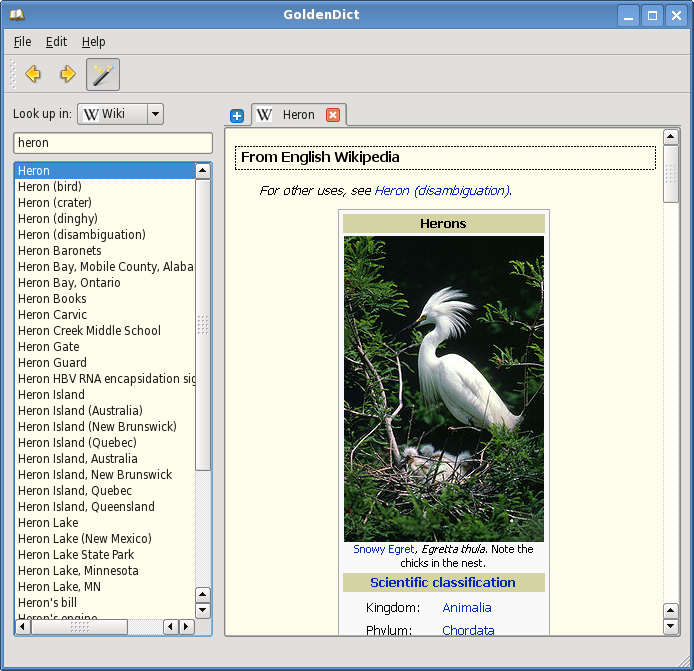
The project aims to create a feature-rich dictionary lookup program. The latest release is 1.0.1. You are welcome to look around, download the program, provide feedback, and join the cause.


Features

The program has the following features:

  • Use of WebKit for an accurate articles' representation, complete with all formatting, colors, images and links.
  • Support of multiple dictionary file formats, namely:
    • Babylon .BGL files, complete with images and resources
    • StarDict .ifo/.dict./.idx/.syn dictionaries
    • Dictd .index/.dict(.dz) dictionary files
    • ABBYY Lingvo .dsl source files, together with abbreviations. The files can be optionally compressed with dictzip. Dictionary resources can be packed together into a .zip file.
    • ABBYY Lingvo .lsa/.dat audio archives. Those can be indexed separately, or be referred to from .dsl files.
  • Support for Wikipedia, Wiktionary, or any other MediaWiki-based sites to perform lookups in.
  • Ability to use arbitrary websites as dictionaries via templated Url patterns.
  • Ability to run arbitrary external programs for audio playback or content generation (text-to-speech, man pages etc) (use the latest Git version for this)
  • Support for looking up and listening to pronunciations from forvo.com
  • Hunspell-based morphology system, used for word stemming and spelling suggestions.
  • Ability to index arbitrary directories with audio files for pronunciation lookups.
  • Full Unicode case, diacritics, punctuation and whitespace folding. This means the ability to type in words without any accents, correct case, punctuation or spaces (e.g. typing 'Grussen' would yield 'grüßen' in German dictionaries).
  • Scan popup functionality. A small window pops up with the translation of a word chosen from another application.
  • Support for global hotkeys. You can spawn the program window at any point, or directly translate a word from the clipboard.
  • Tabbed browsing in a modern Qt 4 interface.
  • Cross-platform: Linux/X11 and Windows + portable to others.
  • Free software: GNU GPLv3+ license.

Mobile version

A commercial mobile version is now available for Android devices. Using it is the best way to support this project financially

Android Users Download Here

Stellarium 0.10.6

Stellarium is a free open source planetarium for your computer. It shows a realistic sky in 3D, just like what you see with the naked eye, binoculars or a telescope.
It is being used in planetarium projectors. Just set your coordinates and go.


Features

sky

  • default catalogue of over 600,000 stars
  • extra catalogues with more than 210 million stars
  • asterisms and illustrations of the constellations
  • constellations for twelve different cultures
  • images of nebulae (full Messier catalogue)
  • realistic Milky Way
  • very realistic atmosphere, sunrise and sunset
  • the planets and their satellites

interface

  • a powerful zoom
  • time control
  • multilingual interface
  • fisheye projection for planetarium domes
  • spheric mirror projection for your own low-cost dome
  • all new graphical interface and extensive keyboard control
  • telescope control

visualisation

  • equatorial and azimuthal grids
  • star twinkling
  • shooting stars
  • eclipse simulation
  • skinnable landscapes, now with spheric panorama projection

customizability

  • plugin system adding artifical satellites, ocular simulation, telescope configuration and more
  • ability to add new solar system objects from online resources...
  • add your own deep sky objects, landscapes, constellation images, scripts...
Download:


    Tuesday, 20 December 2011

    Celestia 1.6.1

    Celestia  is the popular planetarium program by which you can view the universe in 3-D anywhere. It has all the same great features as Celestia including 3-D planet viewing, viewing over 100,000 stars, traveling beyond our galaxy, and more. Plus, it leaves no personal information behind on the machine you run it on, so you can take your favorite astronomy program with you wherever you go.


    Features

    Unlike most planetarium software, Celestia doesn't confine you to the surface of the Earth. You can travel throughout the solar system, to any of over 100,000 stars, or even beyond the galaxy. All movement in Celestia is seamless; the exponential zoom feature lets you explore space across a huge range of scales, from galaxy clusters down to spacecraft only a few meters across. A 'point-and-goto' interface makes it simple to navigate through the universe to the object you want to visit. Celestia is expandable. Celestia comes with a large catalog of stars, galaxies, planets, moons, asteroids, comets, and spacecraft. If that's not enough, you can download dozens of easy to install add-ons with more objects.

     or

    NSIS Portable

    NSIS (Nullsoft Scriptable Install System) Portable is a professional open source system to create standard Windows installers  packaged as a portable app so you can create installers and launchers anywhere

    Features

    NSIS can create Windows installers that are capable of installing, uninstalling, setting system settings, extracting files, etc. Because NSIS is based on script files, you can create both simple and advanced installers. Its features include:
    • Small overhead size
    • Compatible with all major Windows versions
    • Unique compression methods
    • Multiple languages in one installer
    • Many features and checks for the target system
    • Custom dialogs and interfaces
    • Plug-in system
    • Support for web installation, file patching
    • Project integration, different releases and automatic builds
    • Easy and human readable file formats

    TypeFaster Portable touch Typing Tutor

    TypeFaster is a free typing tutor teaches you how to touch-type. Once you can touch-type you will not need to look at the keyboard to find the letters you want to type.


    Features


    • Supports multiple keyboard layouts and more can be added easily (see the developers section). Includes support for non-rectangular keys. The following keyboard layouts are currently supported: Danish, Finnish, French, French-Belgian, German, Hebrew (no lesson files), Italian, Norwegian, Numeric Keypad, Portuguese, Spanish, UK-English, US-Dvorak, US-English
    • A clear indication of which fingers to use. This is the essence of touchtyping.
    • A 3D typing game.
    • Typing statistics and the option of practising the least accurate/slowest/custom keys.
    • Keyboard is not a fixed size (resolution independent).
    • Multi-user support.
    • Teacher support (view student statistics).
    • Interface for editing lesson files and game settings.
    • Backspace support
    • Right to left text support.
    • Variable text size.
    • Lesson files can be prose or poems.
    • Lesson progress indicator.

    Monday, 19 December 2011

    Winamp Pro 5.62 Build 3161 Full Version With Serial Number

    Winamp is a skinnable, multi-format media player.


    Winamp supports a wide variety of contemporary and specialized music file formats, including MIDI, MOD, MPEG-1 audio layers 1 and 2, AAC, M4A, FLAC, WAV, OGG Vorbis, and Windows Media Audio. It supports gapless playback for MP3 and AAC, and Replay Gain for volume leveling across tracks. In addition, Winamp can play and import music from audio CDs, optionally with CD-Text, and can also burn music to CDs. Winamp supports playback of Windows Media Video and Nullsoft Streaming Video, as well as most of the video formats supported by Windows Media Player. 5.1 Surround sound is supported where formats and decoders allow.

    Winamp supports many types of streaming media: Internet radio, Internet telelvision, XM Satellite Radio, AOL video, Singingfish content, podcasts, and RSS media feeds. It also has extendable support for portable media players, and users can access their media libraries anywhere via internet connections.

    You can extend Winamp's functionality through the use of plug-ins, which are available on the Winamp site.


    MiniLyrics 7.1.782 Full Version With Serial Number

    Having your music played has become such a regular activity that installing a full featured music player on your computer is absolutely compulsory. Players now provide sophisticated plug-ins and complex features, but it's not about them I want to talk here. Personally, I enjoy small ad-ons that do a great job in the long run. You can listen to music in many ways, and sometimes maybe you're not even paying attention to details, but this time, I bet you will. 


    One important detail about music refers to lyrics. And it's not the poetical reference that so many people risk to associate with it, but it's simply the practical need of having a song's lyrics displayed on the screen. Minilyrics is a handy lyrics viewer that synchronizes the lines with the playing song. Not such a big deal you might say, but imagine that it is designed to work perfectly with 13 known music players and it works as a powerful standalone lyrics search engine.

    You'll surely say that searching lyrics on the internet is not that difficult and anyone can do it, but only imagine how much time you waste until you open a default web browser, type in the entire name of the artist or song and then select the appropriate result! With Minilyrics you don't even need to have your hands over the mouse or keyboard. Lyrics will be displayed for you in the Minilyrics's panel as rapidly as songs change in the playlist. Of course, the Search and Download lyrics window offers a great facility as you can access it whenever you want to save lyrics for a certain song that is playing.

    I currently tested Minilyrics on Windows Media Player, Winamp and Real Player and I was surprised to find out that it really works well on each of the three applications. You may see this in the sample snapshots, too. If somehow you've got enough of the text flowing down your desktop, you can easily send Minilyrics to the system tray, where from you will be able to access it at any
    time.

    The Lyrics display settings are various and they allow you to choose from a large list of styles: you can view the lyrics in a multiple, normal or double line, as well as in static text style or a movie subtitle style. You may also select to display lyrics in a Karaoke or fade in/ fade out style.

    Minilyrics appears first in a side part of your player as well as in the system tray. What's good is that you can move it wherever you want on the desktop, be it exactly next to your player or as a stand-alone component in a desktop area that you will find more convenient for lyrics displaying. You will see that Minilyrics remembers its last position. 


    Dealing with a complex menu, you'll find yourself spending pretty much time trying to choose a skin for Minilyrics as it comes with so many color schemes that you will definitely find the one that fits your player's skin colors. Note that Minilyrics has an included Winamp-like skin and two default skins that match with the Windows XP style.


    Sunday, 18 December 2011

    USB Port Locked 2.0

    USB Port Locked 2 is a lightweight utility that will help you lock all existing USB ports on your computer. This application is very useful if you want restrict the use of USB ports on your computer for security reasons.

    USB Port Locked 2.0

    USB Port Locked 2.0 New Features :
    • NEW! System Tray Icon. Now USB Port Locked already be hiding in the
    • Tray Icon
    • NEW! Tools viewing process. You can use this tool to see what processes
    • are running on your Windows
    • REPAIR! Improved locking USB port. Now you can lock the USB port is for
    • sure locked.
    USB Port Locked 2.0 Key features :
    • Lock the USB port quickly and all USB ports are locked in a flash
    • Very mild, with a size of 200 KB (compressed) or 1.2 MB (extracted)
    • Portable. You do not need to install this application if you want to use it on another computer
    • Easy to use. Very easy to use this application without requiring
    • any expertise
    • Free. Smoking in use by anyone, anytime. you can free download USB Port Locked 2.0 now.

    back to top
    Twitter Delicious Facebook Digg Stumbleupon Favorites More

     
    Design by Free WordPress Themes | Bloggerized by Lasantha - Premium Blogger Themes | Affiliate Network Reviews