Showing posts with label Education. Show all posts

Wednesday, 21 December 2011

Marble virtual globe and atlas

Marble is a Virtual Globe and World Atlas that you can use to learn more about Earth: You can pan and zoom around and you can look up places and roads. A mouse click on a place label will provide the respective Wikipedia article.


Features

Of course it's also possible to measure distances between locations or watch the current cloud cover. Marble offers different thematic maps: A classroom-style topographic map, a satellite view, street map, earth at night and temperature and precipitation maps. All maps include a custom map key, so it can also be used as an educational tool for use in class-rooms. For educational purposes you can also change date and time and watch how the starry sky and the twilight zone on the map change.
In opposite to other virtual globes Marble also features multiple projections: Choose between a Flat Map ("Plate carré"), Mercator or the Globe.
The best of all: Marble is Free Software / Open Source Software and promotes the usage of free maps. And it's available for all major operating systems (Linux/Unix, MS Windows and Mac OS X).

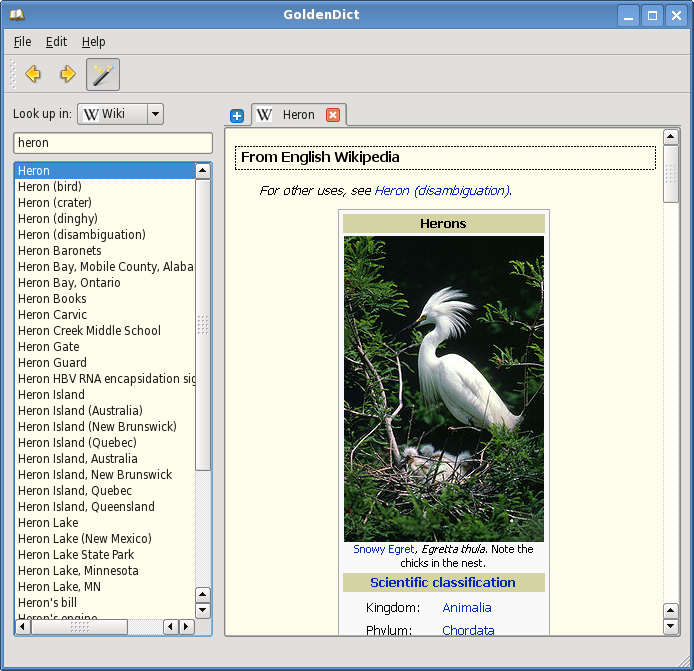
GoldenDict dictionary lookup program

The project aims to create a feature-rich dictionary lookup program. The latest release is 1.0.1. You are welcome to look around, download the program, provide feedback, and join the cause.


Features

The program has the following features:

  • Use of WebKit for an accurate articles' representation, complete with all formatting, colors, images and links.
  • Support of multiple dictionary file formats, namely:
    • Babylon .BGL files, complete with images and resources
    • StarDict .ifo/.dict./.idx/.syn dictionaries
    • Dictd .index/.dict(.dz) dictionary files
    • ABBYY Lingvo .dsl source files, together with abbreviations. The files can be optionally compressed with dictzip. Dictionary resources can be packed together into a .zip file.
    • ABBYY Lingvo .lsa/.dat audio archives. Those can be indexed separately, or be referred to from .dsl files.
  • Support for Wikipedia, Wiktionary, or any other MediaWiki-based sites to perform lookups in.
  • Ability to use arbitrary websites as dictionaries via templated Url patterns.
  • Ability to run arbitrary external programs for audio playback or content generation (text-to-speech, man pages etc) (use the latest Git version for this)
  • Support for looking up and listening to pronunciations from forvo.com
  • Hunspell-based morphology system, used for word stemming and spelling suggestions.
  • Ability to index arbitrary directories with audio files for pronunciation lookups.
  • Full Unicode case, diacritics, punctuation and whitespace folding. This means the ability to type in words without any accents, correct case, punctuation or spaces (e.g. typing 'Grussen' would yield 'grüßen' in German dictionaries).
  • Scan popup functionality. A small window pops up with the translation of a word chosen from another application.
  • Support for global hotkeys. You can spawn the program window at any point, or directly translate a word from the clipboard.
  • Tabbed browsing in a modern Qt 4 interface.
  • Cross-platform: Linux/X11 and Windows + portable to others.
  • Free software: GNU GPLv3+ license.

Mobile version

A commercial mobile version is now available for Android devices. Using it is the best way to support this project financially

Android Users Download Here

Stellarium 0.10.6

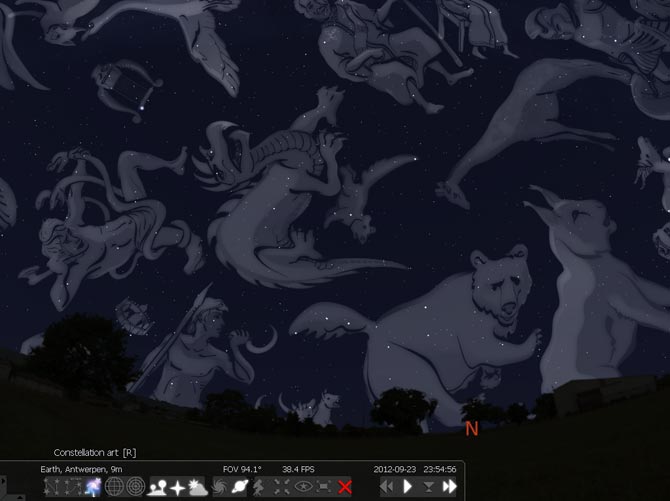
Stellarium is a free open source planetarium for your computer. It shows a realistic sky in 3D, just like what you see with the naked eye, binoculars or a telescope.
It is being used in planetarium projectors. Just set your coordinates and go.


Features

sky

  • default catalogue of over 600,000 stars
  • extra catalogues with more than 210 million stars
  • asterisms and illustrations of the constellations
  • constellations for twelve different cultures
  • images of nebulae (full Messier catalogue)
  • realistic Milky Way
  • very realistic atmosphere, sunrise and sunset
  • the planets and their satellites

interface

  • a powerful zoom
  • time control
  • multilingual interface
  • fisheye projection for planetarium domes
  • spheric mirror projection for your own low-cost dome
  • all new graphical interface and extensive keyboard control
  • telescope control

visualisation

  • equatorial and azimuthal grids
  • star twinkling
  • shooting stars
  • eclipse simulation
  • skinnable landscapes, now with spheric panorama projection

customizability

  • plugin system adding artifical satellites, ocular simulation, telescope configuration and more
  • ability to add new solar system objects from online resources...
  • add your own deep sky objects, landscapes, constellation images, scripts...
Download:


    Tuesday, 20 December 2011

    Celestia 1.6.1

    Celestia  is the popular planetarium program by which you can view the universe in 3-D anywhere. It has all the same great features as Celestia including 3-D planet viewing, viewing over 100,000 stars, traveling beyond our galaxy, and more. Plus, it leaves no personal information behind on the machine you run it on, so you can take your favorite astronomy program with you wherever you go.


    Features

    Unlike most planetarium software, Celestia doesn't confine you to the surface of the Earth. You can travel throughout the solar system, to any of over 100,000 stars, or even beyond the galaxy. All movement in Celestia is seamless; the exponential zoom feature lets you explore space across a huge range of scales, from galaxy clusters down to spacecraft only a few meters across. A 'point-and-goto' interface makes it simple to navigate through the universe to the object you want to visit. Celestia is expandable. Celestia comes with a large catalog of stars, galaxies, planets, moons, asteroids, comets, and spacecraft. If that's not enough, you can download dozens of easy to install add-ons with more objects.

     or

    TypeFaster Portable touch Typing Tutor

    TypeFaster is a free typing tutor teaches you how to touch-type. Once you can touch-type you will not need to look at the keyboard to find the letters you want to type.


    Features


    • Supports multiple keyboard layouts and more can be added easily (see the developers section). Includes support for non-rectangular keys. The following keyboard layouts are currently supported: Danish, Finnish, French, French-Belgian, German, Hebrew (no lesson files), Italian, Norwegian, Numeric Keypad, Portuguese, Spanish, UK-English, US-Dvorak, US-English
    • A clear indication of which fingers to use. This is the essence of touchtyping.
    • A 3D typing game.
    • Typing statistics and the option of practising the least accurate/slowest/custom keys.
    • Keyboard is not a fixed size (resolution independent).
    • Multi-user support.
    • Teacher support (view student statistics).
    • Interface for editing lesson files and game settings.
    • Backspace support
    • Right to left text support.
    • Variable text size.
    • Lesson files can be prose or poems.
    • Lesson progress indicator.

    Friday, 11 November 2011

    TheSage English Dictionary and Thesaurus

    TheSage is a free software application that, through a multi-tool interface, integrates a complete dictionary and a multifaceted thesaurus of the English language together into a unique language reference system.


    TheSage Features:

    TheSage allows you to look up words directly from most applications, offering multiple detailed definitions each coupled with its own thesaurus.

    Main features:


    Comprehensive dictionary Multiple detailed definitions (+210,000)

    Complete thesaurus Nearly 1,400,000 relationships between definitions (synonyms, antonyms, hypernyms, hyponyms, meronyms, holonyms,...)

    Example sentences A large collection that already includes approximately 50,000 examples of usage.
    Pronunciations +70,000 phonetic transcriptions.

    System integration One-click lookup from most applications.

    Information integration Each definition has its own specific thesaurus.

    Cross-referencing Any and all displayed words are clickable, triggering a new lookup.

    Wildcard search Match single/multiple characters as well as filter by single/groups of vowels and consonants.
    Anagram search Only valid English words are returned.

    Portability Fully functional when run from portable devices such as a USB.

    Clipboard support Copy search results, examples, thesauri, definitions.

    Tabbed interface Previous lookups and searches remain readily available.

    Structured display Clean, flexible, fast, and easy to use presentation of information.

    Price Absolutely 100% free of charge.

    Custom appearance Choose your own font and color for each aspect of the display.

    Multi-session history Quickly available via dropdown or the 'History' tool.

    Concordancer Definition and example concordancer tools (so-called 'reverse search').

    Semantic similarity User-defined custom thesaurus.

    Online search Search Wikipedia, Google define/translate, or any other web address directly from TheSage.

    'As you type' tool Browse TheSage's index real-time.

    Phonetic search Carry out relatively sophisticated pattern searches of the phonetic transcriptions (pronunciations) in the database.

    Spell-/sounds-like assistant TheSage will help you if you can't quite remember the word you are looking for.

    Speech TheSage can be turned into a speaking dictionary. Click on the phonetic transcription of a lookup to hear how it is pronounced or have TheSage read all or part of any lookup.

    Word list manager This manager allows the user to store words from a variety of sources. For example, the results of a wildcard or anagram search can be stored in a word list. Word list can be combined (union, intersection, difference, and uniques) as well as imported and exported.


    Saturday, 5 November 2011

    Astronomy (DK Eyewitness Books)


    Astronomy (DK Eyewitness Books)
    Publisher: DK CHILDREN | 2008 | ISBN: 0756637678 | Pages: 72 | PDF | 25,4 MB 

    The word "astronomy" comes from a combination of two Greek words: astron, meaning "star" and nemein, meaning "to name." Even though the beginnings of astronomy go back thousands of years before the ancient Greeks began studying the stars, the science of astronomy has always been based on the same principle of "naming the stars." Many of the names come directly from the Greeks, since they were the first astronomers to make a systematic catalog of all the stars they could see. 
    A number of early civilizations remembered the relative positions of the stars by putting together groups that seemed to make patterns in the night sky. One of these looked like a curling river, so it was called Eridanus, the Great River; another looked like a hunter with a bright belt and dagger and was called Orion, the Hunter. Stars are now named according to their placement inside the pattern and graded according to brightness. For example, the brightest star in the constellation Scorpius is called a Scorpii, because a is the first letter in the Greek alphabet. It is also called Antares, which means "the rival of Mars," because it shines bright red in the night sky and strongly resembles the blood-red planet Mars

    The most trusted nonfiction series on the market, Eyewitness Books provide an in-depth, comprehensive look at their subjects with a unique integration of words and pictures.
    Superb full-color photographs of scientific instruments, experiments, and innovative 3-D models reveal the discoveries and research that have transformed our understanding of the Universe. Learn how space probes photograph planets, what causes a meteor shower, what makes Mars red, why the Sun shines, where the Moon came from, how the first telescopes worked, the stages in the life of a star, and more.


    back to top
    Twitter Delicious Facebook Digg Stumbleupon Favorites More

     
    Design by Free WordPress Themes | Bloggerized by Lasantha - Premium Blogger Themes | Affiliate Network Reviews