Showing posts with label Linux. Show all posts

Wednesday, 21 December 2011

Stellarium 0.10.6

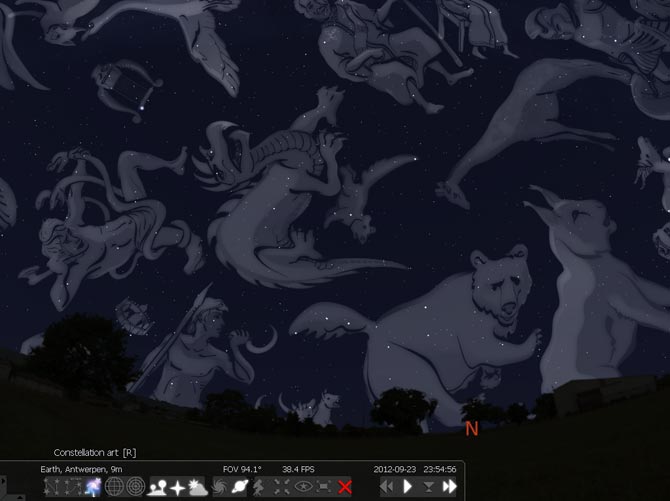
Stellarium is a free open source planetarium for your computer. It shows a realistic sky in 3D, just like what you see with the naked eye, binoculars or a telescope.
It is being used in planetarium projectors. Just set your coordinates and go.


Features

sky

  • default catalogue of over 600,000 stars
  • extra catalogues with more than 210 million stars
  • asterisms and illustrations of the constellations
  • constellations for twelve different cultures
  • images of nebulae (full Messier catalogue)
  • realistic Milky Way
  • very realistic atmosphere, sunrise and sunset
  • the planets and their satellites

interface

  • a powerful zoom
  • time control
  • multilingual interface
  • fisheye projection for planetarium domes
  • spheric mirror projection for your own low-cost dome
  • all new graphical interface and extensive keyboard control
  • telescope control

visualisation

  • equatorial and azimuthal grids
  • star twinkling
  • shooting stars
  • eclipse simulation
  • skinnable landscapes, now with spheric panorama projection

customizability

  • plugin system adding artifical satellites, ocular simulation, telescope configuration and more
  • ability to add new solar system objects from online resources...
  • add your own deep sky objects, landscapes, constellation images, scripts...
Download:


    Tuesday, 20 December 2011

    Celestia 1.6.1

    Celestia  is the popular planetarium program by which you can view the universe in 3-D anywhere. It has all the same great features as Celestia including 3-D planet viewing, viewing over 100,000 stars, traveling beyond our galaxy, and more. Plus, it leaves no personal information behind on the machine you run it on, so you can take your favorite astronomy program with you wherever you go.


    Features

    Unlike most planetarium software, Celestia doesn't confine you to the surface of the Earth. You can travel throughout the solar system, to any of over 100,000 stars, or even beyond the galaxy. All movement in Celestia is seamless; the exponential zoom feature lets you explore space across a huge range of scales, from galaxy clusters down to spacecraft only a few meters across. A 'point-and-goto' interface makes it simple to navigate through the universe to the object you want to visit. Celestia is expandable. Celestia comes with a large catalog of stars, galaxies, planets, moons, asteroids, comets, and spacecraft. If that's not enough, you can download dozens of easy to install add-ons with more objects.

     or

    Monday, 14 November 2011

    Best USB Installer tool for Linux & Windows7

    Universal USB Installer is a Live Linux (windows 7 also supported) USB Creator that allows you to choose from a selection of Linux Distributions to put on your USB Flash Drive. The Universal USB Installer is easy to use. Simply choose a Live Linux Distribution, the ISO file, your Flash Drive and, Click Install. Other features include; Persistence (if available), and the ability to fat32 format the flash drive (recommended) to ensure a clean install. Upon completion, you should have a ready to run bootable USB Flash Drive with your select Linux version installed.


    USB Flash Drive Creation Prerequisites:
    • Universal-USB-Installer-1.8.6.9.exe
    • Windows XP/Vista/7 to create the USB (Win 98/2K WILL NOT Work!)
    • Fat32 Formatted Flash Drive
    • PC with a BIOS that can boot from USB
    • Your Favorite Linux ISO  


    IMPORTANT NOTE: Ensure that your USB drive is fat16/fat32 formatted, otherwise Syslinux will fail and your drive will NOT Boot.  

    Friday, 21 October 2011

    Download Ubuntu 11.10 (Oneiric Ocelot) Wallpapers Package

    Canonical and the Ubuntu developers have released version 11.10 of their popular Ubuntu Linux distribution, code named as “Oneiric Ocelot”. Ubuntu 11.10 comes with a collection of 16 New Stunning Wallpapers contributed by community members , including the one that will be set as default desktop wallpaper. All the backgrounds Wallpapers are in high-resolution, ranging from art, sceneries, flowers, and other macro shots too.
    Below are few of the wallpapers included in Ubuntu 11.10 official wallpaper collection.:


    You can check out all the new Wallpapers at the Ubuntu tour site by clicking ‘View photos’ from the Welcome screen.
    Download the entire Wallpapers Package here.
    Users running other operating systems like Windows and Mac will still be able to download the theme and extract the content wallpapers with the help of an archiving utility such as 7-Zip.

    back to top
    Twitter Delicious Facebook Digg Stumbleupon Favorites More

     
    Design by Free WordPress Themes | Bloggerized by Lasantha - Premium Blogger Themes | Affiliate Network Reviews